Table of Contents
FAQ on Game Boy Advance SP issues
Friends, there’s a new article on the site: EZ-Flash Air Review: Features, Limitations, and Comparison with Other Models.
ChisLink - a revolution in the GBA world.
Friends, AliExpress now has:
Cool metal labels for Game Boy Advance consoles. Important: the OMEGA series will no longer be produced — it is being replaced in the lineup by the EZ-Flash Air.
Cool eXtremeRate cases for GBA SP.
Friends, help me buy (if you have) various old stuff: Help me buy.
In this article, we will try to answer all your questions related to issues when using the Game Boy Advance SP.
What do the LEDs (lights) on the GBASP indicate?
When turning on a (charged) console, only the green LED should light up.
If the red LED lights up when turning on the console, it means your battery is discharged.
If the orange LED is on, your console is charging.
If both the green and orange LEDs are on, your console is on and charging.
If both the red and orange LEDs are on, the battery is almost discharged, but the console is charging.
If you turn on the Game Boy Advance SP, but it turns off after flashing the red LED, it means your battery is dead.
If you put the console on charge and the orange LED appears and immediately turns off, it could indicate two things:
1. Your battery is fully charged.
2. Your console's charging is broken. That is, something is wrong with the charging process (more on this later).
If the console shows no signs of life, that is, no LEDs light up, then most likely you have a problem with a dead battery or the power switch (more on this later).
If the red LED is on with a fully charged battery (or when you touch the power switch it flashes), it means you have a problem with the power switch and it needs to be cleaned (more on this later).
If the console turns off during gameplay (or from a sudden movement), it means you have a problem with the power switch and it needs to be cleaned (more on this later).
If the Game Boy Advance SP is working and the green LED is on, but after inserting a cartridge the red LED lights up, it could indicate two things:
1. You have a dead battery.
2. Possibly (!) you have modified something in the console and it is not working properly. In my case, this happened with the F2 fuse, which caused such strange behavior in the Game Boy Advance SP.
Simple Issues
I installed a new screen, but it flickers (has stripes or flickers).
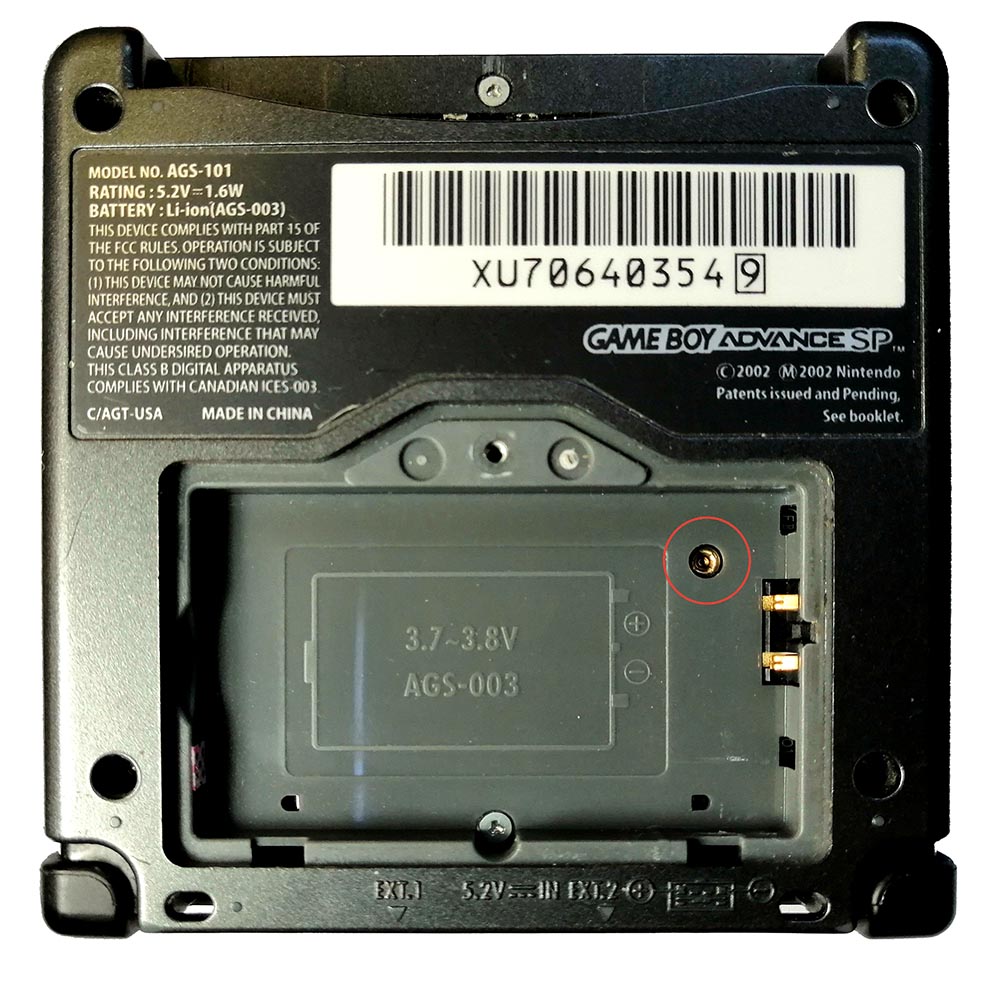
You need to adjust the potentiometer located behind the battery (remove the cover and you will immediately see the hole with it). Just turn it in different directions and see where it looks better (do not turn too hard!).
My Game Boy Advance (SP) reads cartridges poorly.
This is most likely related to the cartridges themselves, a fairly common problem. You need to take isopropyl alcohol and apply it to the cartridge contacts. Wait a minute and gently clean the contacts with an eraser. You will be surprised how much dirt there is.
My console turns on in Game Boy mode, not Game Boy Advance mode (i.e., the screen is small and square, not full width).
There is a special switch for turning on the console in a different mode (to support older games).
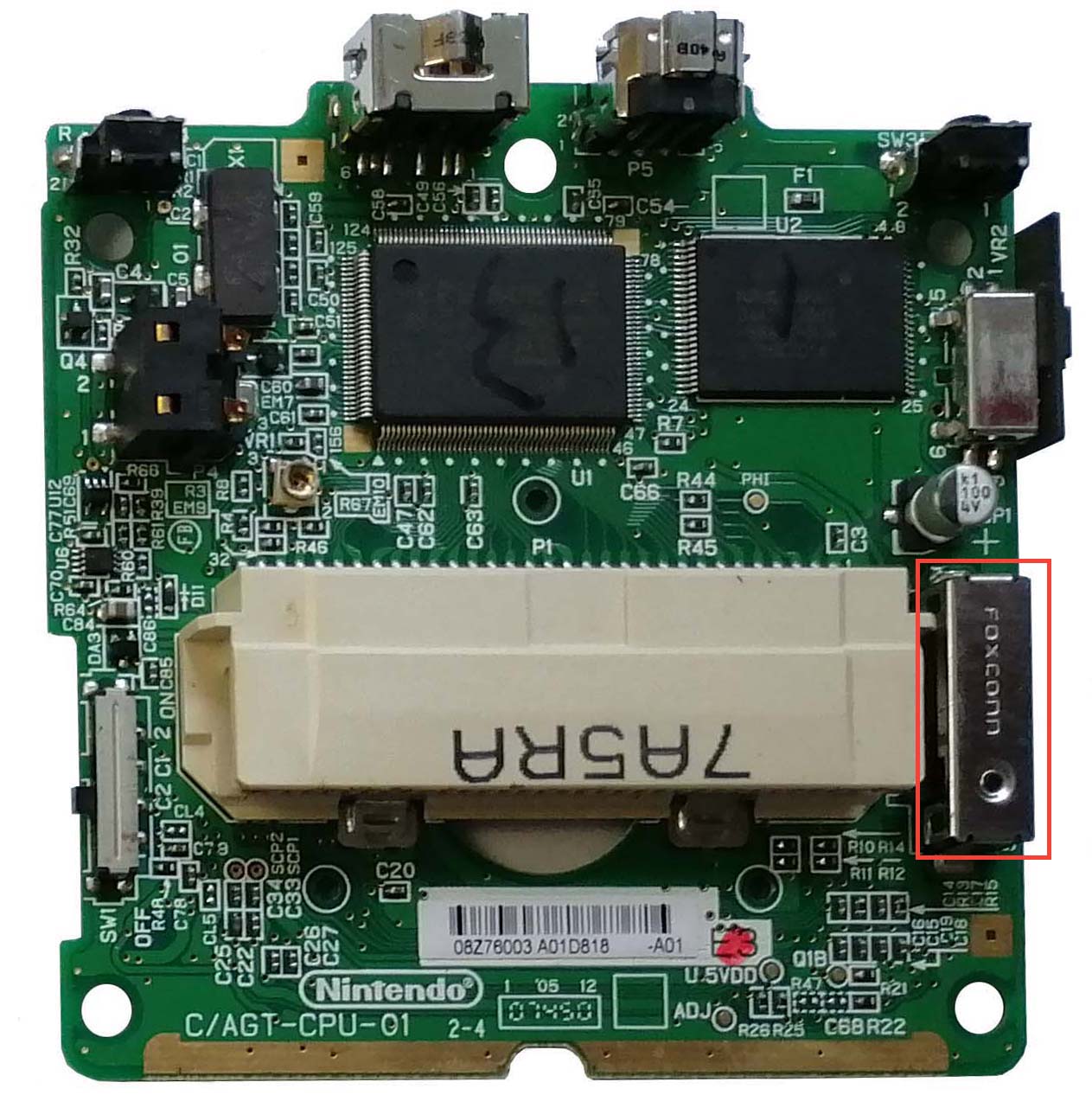
And if you look closely, you can see the switch itself:
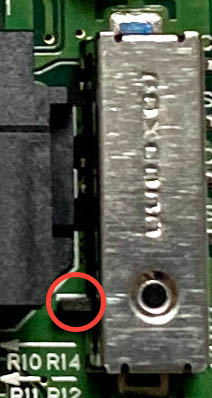
There are several options:
1. It is simply stuck / stuck in the Game Boy game position, then you need to return it to the Game Boy Advance game position (as in the picture).
2. You have a low-quality cartridge that touches this switch and puts it in the Game Boy game position. What to do in this case is not very clear.
For more information about the switch itself, you can read our article: The main feature that distinguishes a fake Game Boy Advance SP from an original one
I have no sound. (Or the sound constantly turns off, and when I press the console, it turns on).
There are three possible scenarios:
1. The speaker's contacts are pressed against the speaker itself, and when you hold the Game Boy Advance SP in the air, they do not touch the board contacts. It is solved very simply, you need to disassemble the console and slightly bend the contacts (marked in red) away from the speaker.
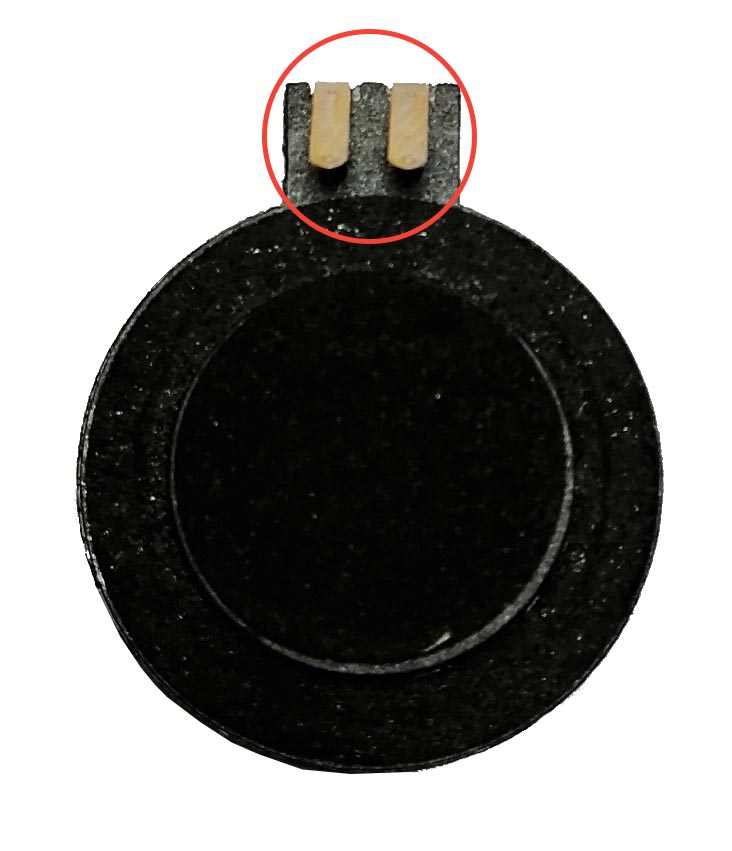
2. The speaker is broken. You can check it with a multimeter, there should be 8 ohms resistance on the contacts.
3. You have spilled/dropped/broken the traces leading to the speaker. There is no universal solution here. But here, probably, you will have many problems besides sound.
After installing the AGS-101 screen on the Game Boy Advance, the games do not start.
If after installing the AGS-101 screen on the Game Boy Advance your games suddenly stopped loading, then most likely the issue is that the screen's metal side is contacting the cartridge connector contacts.
You just need to insulate the screen, usually electrical tape is enough.
My Game Boy Advance (SP) does not start or read cartridges, what should I do?
There are two possible scenarios:
1. You have broken the console's cartridge port (or, for example, spilled liquid on the console). There is no universal solution here, except for repairing or replacing the port. Unless you check if the port's contacts have lifted up and put them back in place (this is visible if you carefully examine the cartridge port). Also, clean the port with isopropyl alcohol (but carefully).
You can watch how I clean my console in this video:

2. The problem is not with the port, but with the cartridge itself. The cartridge contacts become dirty over time. This is not visible to the eye, but if you pour isopropyl alcohol on the contacts, take a soft eraser and gently rub the contacts, you will be surprised how much dirt there is. At one time, when buying cartridges, 90% of old flash cartridges did not want to start, but after such cleaning, they immediately started working.
The buttons (A + B + D-pad) on my Game Boy Advance (not SP) are not working well.
On the actual GBA, there are no buttons, per se, there are only contact pads. Look at the photo of the motherboard, all the buttons are just contacts:
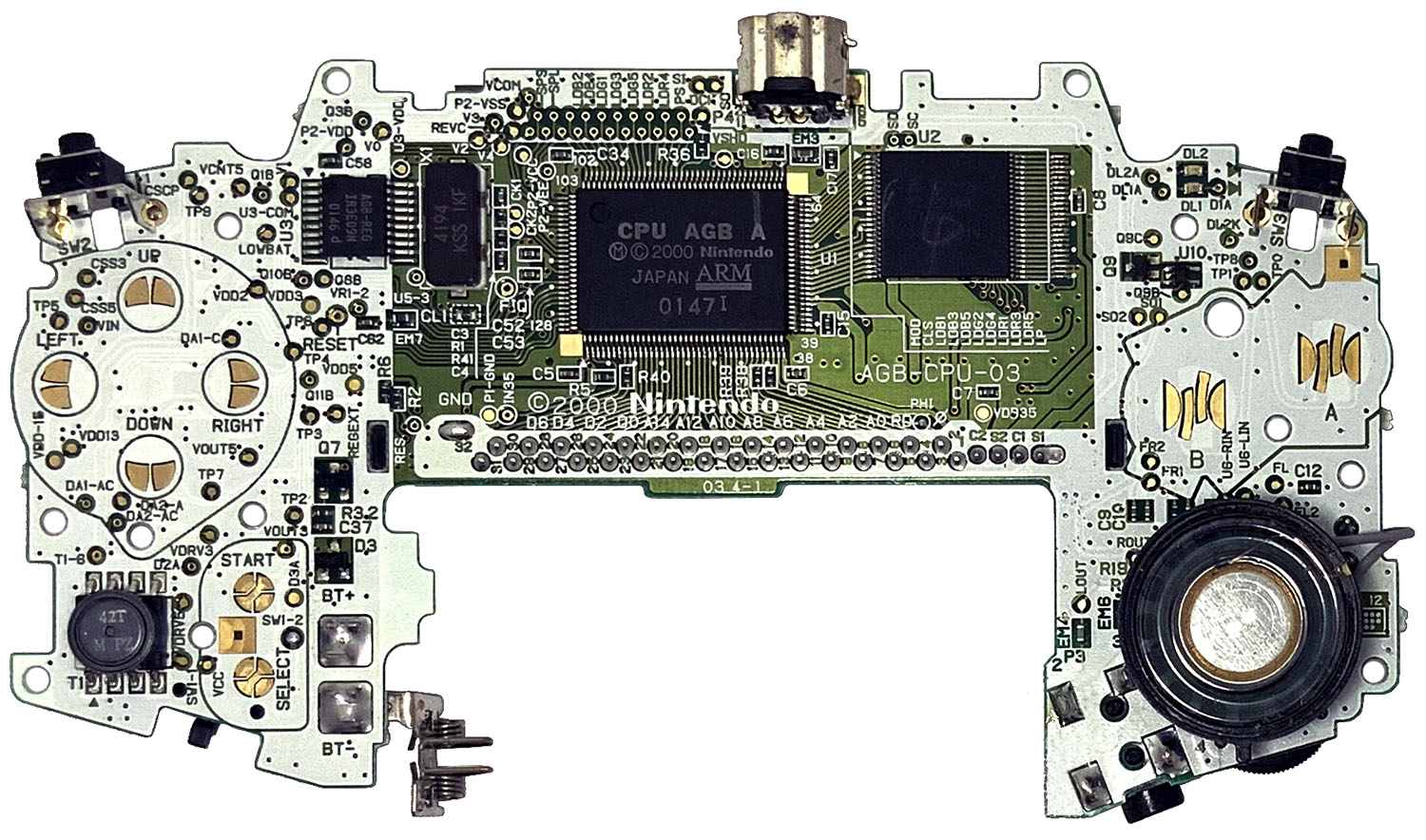
Therefore, if the buttons work at some point, then the motherboard is fine. The conductive rubber pads have started to work poorly.
1. Two contacts on the motherboard that need to be closed for the console to understand that the button is pressed;
2. A conductive rubber pad that conducts current between the two contacts, so when you press the button, the pad closes the two contacts.
3. A plastic button that you press. It presses on the rubber pad to close the contacts.
You need to understand that over time these rubber pads begin to dry out and deteriorate (well, in principle, 20 years is a long time for a small rubber pad). There are two options for what to do:
1. Put a regular A4 sheet of paper on the table, put the rubber pad on top and rub it against the paper. This will slightly remove the top layer of rubber, and it will start conducting current better. (This is a bad option and works so-so).
2. Order new rubber pads from AliExpress and replace them. This option is better, but order two sets at once, because sometimes some pads are not very good quality or too hard (which means playing will not be very comfortable).
You can buy rubber pads here:
Medium Issues
My battery died, what should I do?
If you want to replace the battery in the Game Boy Advance SP, you have three options. All three options use the same purchased battery. The differences are only in the final design.
In the test (GBA SP AGS-101 with minimum brightness and no sound), the runtime of such a purchased battery was - 17 hours 8 minutes!
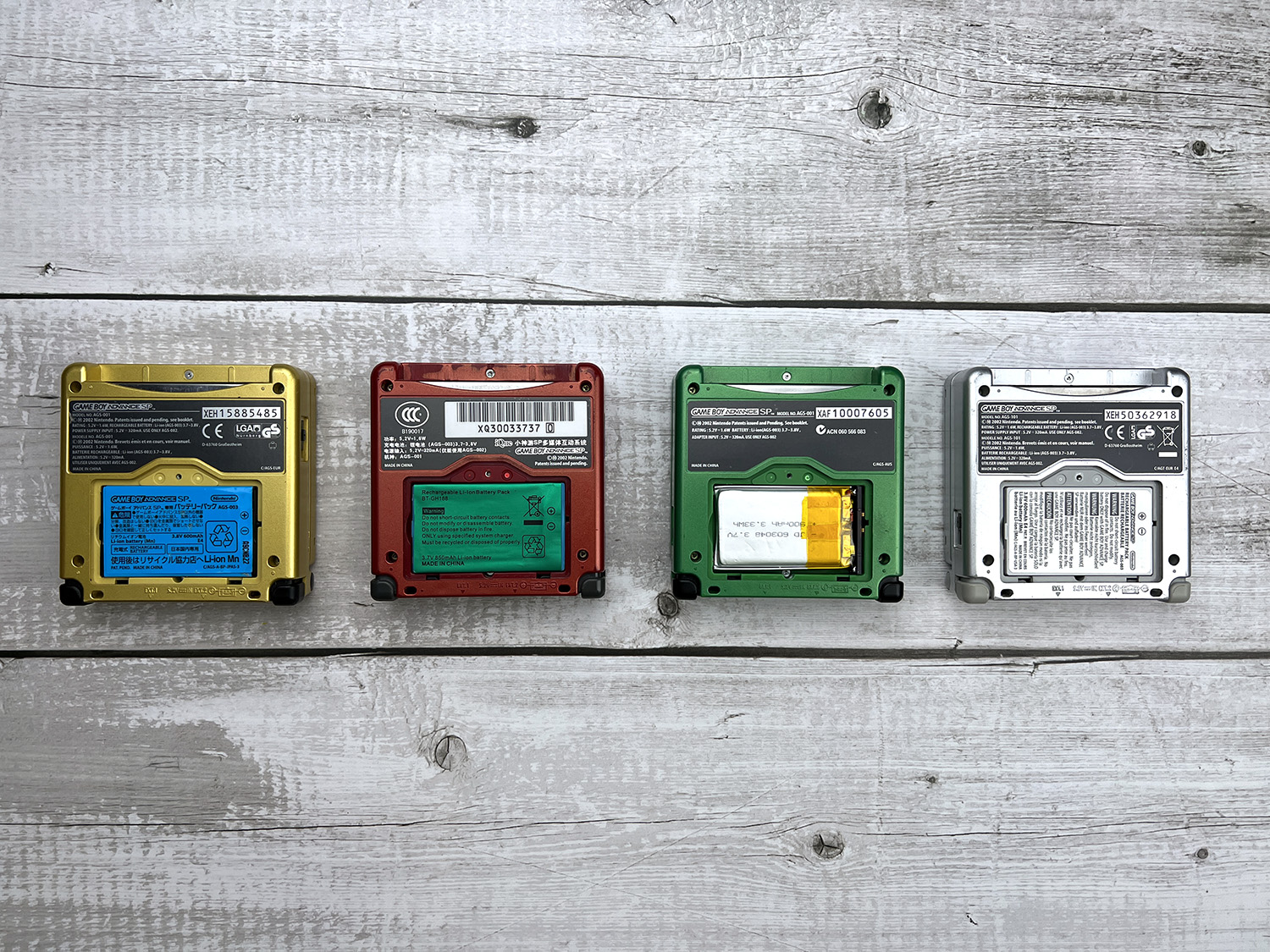
1. Replace the insides of the original battery (yellow console with blue battery);
2. Buy a ready-made solution on AliExpress and immediately replace the battery there (red console with green battery);
3. Buy a plate from Makho (green console);
4. For comparison, just the original battery.
The algorithm is as follows:
If your battery can be modified, then read the article: "Replacing the insides of the battery for Game Boy Advance SP".
If your battery is not suitable for modification (for example, it is completely in a plastic case), then you can buy a base for modification on AliExpress: Purchased battery for Game Boy Advance SP
Previously, you could buy Makho plates, but now they are not delivered to Russia.
What should I do if the console turns off when shaken?
The problem is with the switch that turns the console on or off. It tends to get dirty, and since turning on is done by closing the contact, it means that dirt has accumulated or the contacts have oxidized and need to be cleaned. What to do can be read in this article: Game Boy Advance SP cleaning the on/off switch
My light is constantly red and does not turn green, even if the battery is fully charged.
If you are sure that the battery is charged, then this is the same problem as when the console turns off when shaken. You need to clean the console's power switch. What to do can be read in this article: Game Boy Advance SP cleaning the on/off switch
The side buttons are not working, what should I do?
Either resolder them or clean them, as described in the article: Game Boy Advance SP side buttons (shifts) not working
Won't Turn On
My Game Boy Advance SP won't turn on (or turns on and immediately turns off).
Here things are a bit more complicated. There are five possible problems:
1. The power switch is dirty and needs to be cleaned (a common problem). What to do can be read in this article: Game Boy Advance SP cleaning the on/off switch
2. The Game Boy Advance SP has 2 fuses, F1 and F2. F1 disconnects the power connector (where the charger is inserted). F2 disconnects the battery. In case of problems with the charger or its port, F1 burns out, in case of problems with the battery, F2 burns out. Accordingly, they need to be replaced. However, fuses do not burn out for no reason! This means there must be a problem, and before replacing the fuse, it needs to be fixed! Never bypass the fuse directly, there is a high chance of burning everything out.
3. The problem is directly with the battery. To check, take a multimeter and make sure the voltage on the battery is above 3 volts. If less, it needs to be replaced. For example, with this battery mod for GBA SP.
4. The battery is dead, but it is dead because it is not charging, which means there is a problem with its charging (more on this later).
5. You have a unique problem. In this case, you can simply buy another Game Boy Advance SP or a separate motherboard from it.
When charging the console, the charging indicator does not light up at all (or the charging indicator lights up for only a second and then turns off).
There are two options: 1. Everything is fine with you, just when the battery is fully charged, the Game Boy Advance SP does not allow it to charge further (it is smart). It is easy to check, you need to play for about 10-20 minutes and put it on charge again, if everything lights up, then you are lucky.
2. If nothing lights up, then you have problems. Usually this means that you have more serious problems. Then read our article: Game Boy Advance SP not charging?